Castelo_e_trem
Use the uploaded image as the only identity reference.
Identity lock – face, hair, gender (100% from photo)
Keep the exact same face and likeness from the reference photo, preserving 100% of real facial structure and proportions in the side-profile silhouette.
Maintain the same nose shape, lips and mouth shape, chin, jawline, forehead slope, ear shape, and head proportions so the silhouette is clearly the same person.
Preserve the same hairstyle family (length, volume, hairline, general silhouette, and direction of strands) in the side profile, even as the edges dissolve into stardust and painterly strokes.
Keep the same gender expression and overall character; do not beautify, de-age, or alter facial anatomy beyond the artistic double‑exposure effect.
Base composition – surreal double exposure
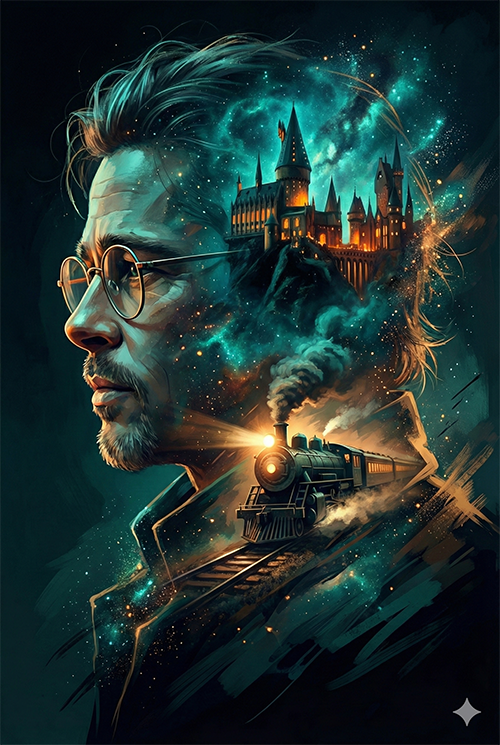
Create a breathtaking surrealist double‑exposure portrait using a side‑profile silhouette of the uploaded face as the main shape container.
The subject wears thin round wire‑rimmed glasses that catch the light with subtle highlights and reflections, matching the positioning from the real face.
Treat the silhouette like a window into a magical fantasy world, with different regions of the head and neck transitioning between castle and train scenes.
Inside the silhouette – castle and nebula (upper head)
In the upper cranial area, place a majestic towering gothic castle with sharp spires and intricate architecture, embedded inside the silhouette.
The castle windows glow with warm orange light, standing out against a deep cosmic nebula sky filled with swirling stars, clouds of teal and indigo, and subtle galactic patterns.
Blend the castle and nebula seamlessly into the curvature of the head, following the skull shape so the interior scene feels naturally integrated with the profile.
Inside the silhouette – steam train (neck and shoulders)
In the neck and shoulder region of the silhouette, transform the interior into a vintage steam engine train barreling forward on tracks.
The train’s blindingly bright headlight sits approximately where the throat is, acting as the central light source inside the lower silhouette.
Let smoke, steam, and sparks flow backward along the neck and shoulder lines, visually bridging the train scene with the castle and nebula above.
Color, lighting, and atmosphere
Render everything in a dark fantasy digital art style with a rich teal and amber color palette, accented by deep blues, dark cyans, and warm orange glows.
Use volumetric lighting that streams through castle towers, nebula clouds, and train steam, creating god‑rays and layered atmospheric depth inside the silhouette.
Add bioluminescent particle effects and floating bokeh orbs around and within the silhouette, especially near the glasses, castle lights, and train headlight.
Edges, hair, and coat dissolution
Let the hair and coat edges dissolve into glowing stardust, messy strands, and rough painterly strokes that escape from the silhouette into the surrounding darkness.
Use scattered particles, tiny glowing fragments, and broken brush strokes to create a dreamlike transition between the subject and the dark void background.
Keep the overall background mostly dark and minimal, so the silhouette and internal scenes remain the primary focal point.
Rendering quality and style
High‑detail, highly intricate digital painting with cinematic composition and strong focus on silhouette clarity and interior scene blending.
Emphasize high contrast between bright inner light sources (castle windows, headlight, nebula highlights) and the dark surrounding tones, for a dramatic magical realism look.
Target an 8K‑style resolution feel with crisp textures on architecture, train machinery, glasses, and particles, while still maintaining painterly brushwork rather than pure photorealism.
Technical / style constraints
Overall style: dark‑fantasy surreal double exposure, cinematic, magical realism, cyber‑fantasy color grading with teal‑and‑amber mood.
Keep realism in anatomy and profile shape but avoid full photorealistic rendering; prioritize stylized digital art with visible brushwork and atmospheric effects.
Negative prompt – strictly avoid
Photorealistic skin, overly smooth or plastic skin, anime, cartoon, flat illustration, low detail, blurry, overexposed areas, flat colors, excessive realism, plastic look, AI artifacts.
Harsh vector‑style outlines, clean icon/logo shapes, UI elements, or any text in the image; remove and exclude all text and logos.
Identity lock – face, hair, gender (100% from photo)
Keep the exact same face and likeness from the reference photo, preserving 100% of real facial structure and proportions in the side-profile silhouette.
Maintain the same nose shape, lips and mouth shape, chin, jawline, forehead slope, ear shape, and head proportions so the silhouette is clearly the same person.
Preserve the same hairstyle family (length, volume, hairline, general silhouette, and direction of strands) in the side profile, even as the edges dissolve into stardust and painterly strokes.
Keep the same gender expression and overall character; do not beautify, de-age, or alter facial anatomy beyond the artistic double‑exposure effect.
Base composition – surreal double exposure
Create a breathtaking surrealist double‑exposure portrait using a side‑profile silhouette of the uploaded face as the main shape container.
The subject wears thin round wire‑rimmed glasses that catch the light with subtle highlights and reflections, matching the positioning from the real face.
Treat the silhouette like a window into a magical fantasy world, with different regions of the head and neck transitioning between castle and train scenes.
Inside the silhouette – castle and nebula (upper head)
In the upper cranial area, place a majestic towering gothic castle with sharp spires and intricate architecture, embedded inside the silhouette.
The castle windows glow with warm orange light, standing out against a deep cosmic nebula sky filled with swirling stars, clouds of teal and indigo, and subtle galactic patterns.
Blend the castle and nebula seamlessly into the curvature of the head, following the skull shape so the interior scene feels naturally integrated with the profile.
Inside the silhouette – steam train (neck and shoulders)
In the neck and shoulder region of the silhouette, transform the interior into a vintage steam engine train barreling forward on tracks.
The train’s blindingly bright headlight sits approximately where the throat is, acting as the central light source inside the lower silhouette.
Let smoke, steam, and sparks flow backward along the neck and shoulder lines, visually bridging the train scene with the castle and nebula above.
Color, lighting, and atmosphere
Render everything in a dark fantasy digital art style with a rich teal and amber color palette, accented by deep blues, dark cyans, and warm orange glows.
Use volumetric lighting that streams through castle towers, nebula clouds, and train steam, creating god‑rays and layered atmospheric depth inside the silhouette.
Add bioluminescent particle effects and floating bokeh orbs around and within the silhouette, especially near the glasses, castle lights, and train headlight.
Edges, hair, and coat dissolution
Let the hair and coat edges dissolve into glowing stardust, messy strands, and rough painterly strokes that escape from the silhouette into the surrounding darkness.
Use scattered particles, tiny glowing fragments, and broken brush strokes to create a dreamlike transition between the subject and the dark void background.
Keep the overall background mostly dark and minimal, so the silhouette and internal scenes remain the primary focal point.
Rendering quality and style
High‑detail, highly intricate digital painting with cinematic composition and strong focus on silhouette clarity and interior scene blending.
Emphasize high contrast between bright inner light sources (castle windows, headlight, nebula highlights) and the dark surrounding tones, for a dramatic magical realism look.
Target an 8K‑style resolution feel with crisp textures on architecture, train machinery, glasses, and particles, while still maintaining painterly brushwork rather than pure photorealism.
Technical / style constraints
Overall style: dark‑fantasy surreal double exposure, cinematic, magical realism, cyber‑fantasy color grading with teal‑and‑amber mood.
Keep realism in anatomy and profile shape but avoid full photorealistic rendering; prioritize stylized digital art with visible brushwork and atmospheric effects.
Negative prompt – strictly avoid
Photorealistic skin, overly smooth or plastic skin, anime, cartoon, flat illustration, low detail, blurry, overexposed areas, flat colors, excessive realism, plastic look, AI artifacts.
Harsh vector‑style outlines, clean icon/logo shapes, UI elements, or any text in the image; remove and exclude all text and logos.