Fases_da_vida
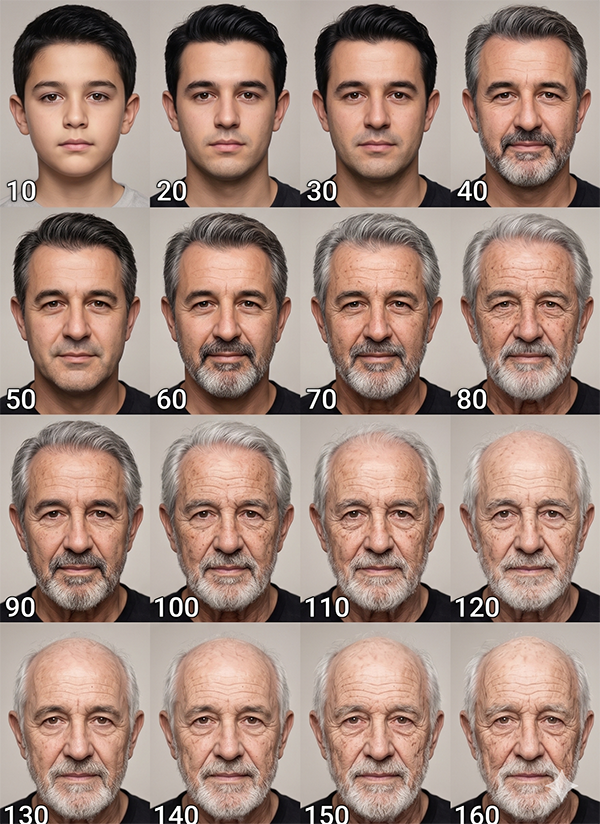
Use the uploaded reference image as the primary face and identity reference for all 16 portraits.
Face reference weight: very high.
Identity preservation: ON.
Minimal variation: ON.
Positive prompt (what to generate)
Create a 4x4 studio portrait grid showing the same person at different life stages, using the uploaded reference image as the primary face reference, keeping the identity 100% consistent and clearly recognizable in every frame.
Maintain the exact facial identity from the reference photo: same facial features, bone structure, skin tone, gender, perceived age range, hairstyle shape and general facial proportions.
Do not change the person’s gender and do not make the face noticeably younger or older than the natural progression for each age.
Preserve the original facial expression, nose, eyes, lips, jawline, cheekbones and any unique marks such as moles, freckles, scars or skin texture from the reference image.
FACE CONSISTENCY — TOP PRIORITY:
The face must remain strongly consistent and instantly recognizable across all 16 images.
Preserve at all ages:
Core facial structure and proportions
Eye shape, spacing and gaze direction
Eyebrow shape and density
Nose structure
Lip shape
Jawline and cheekbones
Allow only natural age progression changes such as wrinkles, skin texture evolution and hair changes while keeping the identity clearly recognizable.
Age progression concept
Generate a clean 4x4 grid collage of the same person at these life stages (left → right, top → bottom), with realistic but slightly stylized age progression:
Row 1: ages 10, 20, 30, 40
Row 2: ages 50, 60, 70, 80
Row 3: ages 90, 100, 110, 120
Row 4: ages 130, 140, 150, 160
All ages are stylized but should remain grounded in realistic human aging progression, without turning into fantasy creatures or exaggerated caricatures.
AGING DETAILS BY RANGE:
Younger stages (10–30):
Smoother skin, no wrinkles
Fuller hair with more volume and density
Fresh, healthy skin appearance
Middle age (40–60):
Subtle wrinkles around eyes and mouth
Slight facial maturity and volume changes
Hair starting to show a few gray strands or slightly desaturated color
Older stages (70–100):
Deeper wrinkles and visible expression lines
More defined skin texture, slight sagging
Age spots and natural discoloration, realistic but flattering
Advanced age (110–160, stylized but realistic):
Thinner skin with more pronounced wrinkles
Reduced facial volume and softer contours
Stronger age spots and very visible aged skin texture
Hair progression across the grid:
From full, dense hair in youth → slightly gray in middle age → predominantly gray in older age → thinning hair and receding hairline → partially bald in the most advanced ages, always matching the original hairstyle pattern and direction from the reference.
Skin progression across the grid:
Smooth skin in youth → fine lines in middle age → more wrinkles and folds → deep wrinkles and aged skin texture in advanced ages.
Style & composition
Overall style: ultra-realistic, photorealistic age progression portrait series, clean professional studio look.
Composition: head-and-shoulders framing for every portrait, same angle and same camera distance as the reference image, eye-level perspective.
Background: neutral, plain studio backdrop (light gray or soft beige), no props, no distractions.
Layout: perfectly aligned 4x4 grid, all faces centered in each cell, identical scale and positioning, even spacing between frames, clean borders.
Aspect ratio: overall image in standard rectangular orientation suitable for a collage grid (for example 4:5 or 3:4; keep consistent).
TEXT IN EACH FRAME:
Add the age number in each frame in the bottom corner (for example: “10”, “20”, “30”, etc.).
Use a simple, clean, legible sans-serif font, white or subtle high-contrast color depending on the background, small but clearly readable.
Lighting
Soft studio lighting with even illumination across all faces.
Classic beauty or portrait lighting with gentle falloff, no harsh shadows or dramatic contrast.
Same lighting setup for every frame to keep the portraits consistent.
Balanced HDR-style exposure, no blown highlights, no crushed shadows.
Camera, lens and quality
Camera: eye-level portrait camera view.
Lens: 85mm portrait lens look, natural perspective, no distortion.
Framing: tight head-and-shoulders portrait, centered subject, straight-on angle to match the reference image.
Quality: photorealistic, ultra-detailed, 8K resolution, HDR-style dynamic range, high detail in skin texture, pores, hair strands and eyes.
Color: neutral, natural skin tones, subtle cinematic color grading but still realistic.
Quality and style tags
Add these descriptive quality tags to reinforce the style and fidelity:
ultra-realistic, photorealistic, age progression, consistent identity, studio portrait grid, hyper-detailed skin, cinematic realism, 8k, HDR, clean studio background, neutral tones, precise facial structure, high-frequency skin detail, realistic wrinkles, natural hair evolution, professional headshot style, reference-accurate face.
Negative prompt (what to avoid)
Do not change the person’s gender.
Do not change ethnicity or skin tone.
Do not de-age or over-age the person beyond the specified age progression logic.
Do not alter core facial structure, eye shape, nose size, lips shape, jawline or cheekbones.
No face-swapping, no mixing with other identities, no morphing into different people.
No extreme facial distortions, no cartoon or anime style, no exaggerated caricature features.
No makeup that drastically changes the person’s appearance (keep makeup minimal or natural if present).
No accessories covering the face (no masks, heavy sunglasses, large hats obscuring features).
No busy or colorful backgrounds; avoid props and complex environments.
No harsh dramatic lighting, strong color casts, or heavy vignettes that hide skin details.
No low resolution, no blurry images, no painterly or illustration style; keep everything photorealistic and sharp.
Face reference weight: very high.
Identity preservation: ON.
Minimal variation: ON.
Positive prompt (what to generate)
Create a 4x4 studio portrait grid showing the same person at different life stages, using the uploaded reference image as the primary face reference, keeping the identity 100% consistent and clearly recognizable in every frame.
Maintain the exact facial identity from the reference photo: same facial features, bone structure, skin tone, gender, perceived age range, hairstyle shape and general facial proportions.
Do not change the person’s gender and do not make the face noticeably younger or older than the natural progression for each age.
Preserve the original facial expression, nose, eyes, lips, jawline, cheekbones and any unique marks such as moles, freckles, scars or skin texture from the reference image.
FACE CONSISTENCY — TOP PRIORITY:
The face must remain strongly consistent and instantly recognizable across all 16 images.
Preserve at all ages:
Core facial structure and proportions
Eye shape, spacing and gaze direction
Eyebrow shape and density
Nose structure
Lip shape
Jawline and cheekbones
Allow only natural age progression changes such as wrinkles, skin texture evolution and hair changes while keeping the identity clearly recognizable.
Age progression concept
Generate a clean 4x4 grid collage of the same person at these life stages (left → right, top → bottom), with realistic but slightly stylized age progression:
Row 1: ages 10, 20, 30, 40
Row 2: ages 50, 60, 70, 80
Row 3: ages 90, 100, 110, 120
Row 4: ages 130, 140, 150, 160
All ages are stylized but should remain grounded in realistic human aging progression, without turning into fantasy creatures or exaggerated caricatures.
AGING DETAILS BY RANGE:
Younger stages (10–30):
Smoother skin, no wrinkles
Fuller hair with more volume and density
Fresh, healthy skin appearance
Middle age (40–60):
Subtle wrinkles around eyes and mouth
Slight facial maturity and volume changes
Hair starting to show a few gray strands or slightly desaturated color
Older stages (70–100):
Deeper wrinkles and visible expression lines
More defined skin texture, slight sagging
Age spots and natural discoloration, realistic but flattering
Advanced age (110–160, stylized but realistic):
Thinner skin with more pronounced wrinkles
Reduced facial volume and softer contours
Stronger age spots and very visible aged skin texture
Hair progression across the grid:
From full, dense hair in youth → slightly gray in middle age → predominantly gray in older age → thinning hair and receding hairline → partially bald in the most advanced ages, always matching the original hairstyle pattern and direction from the reference.
Skin progression across the grid:
Smooth skin in youth → fine lines in middle age → more wrinkles and folds → deep wrinkles and aged skin texture in advanced ages.
Style & composition
Overall style: ultra-realistic, photorealistic age progression portrait series, clean professional studio look.
Composition: head-and-shoulders framing for every portrait, same angle and same camera distance as the reference image, eye-level perspective.
Background: neutral, plain studio backdrop (light gray or soft beige), no props, no distractions.
Layout: perfectly aligned 4x4 grid, all faces centered in each cell, identical scale and positioning, even spacing between frames, clean borders.
Aspect ratio: overall image in standard rectangular orientation suitable for a collage grid (for example 4:5 or 3:4; keep consistent).
TEXT IN EACH FRAME:
Add the age number in each frame in the bottom corner (for example: “10”, “20”, “30”, etc.).
Use a simple, clean, legible sans-serif font, white or subtle high-contrast color depending on the background, small but clearly readable.
Lighting
Soft studio lighting with even illumination across all faces.
Classic beauty or portrait lighting with gentle falloff, no harsh shadows or dramatic contrast.
Same lighting setup for every frame to keep the portraits consistent.
Balanced HDR-style exposure, no blown highlights, no crushed shadows.
Camera, lens and quality
Camera: eye-level portrait camera view.
Lens: 85mm portrait lens look, natural perspective, no distortion.
Framing: tight head-and-shoulders portrait, centered subject, straight-on angle to match the reference image.
Quality: photorealistic, ultra-detailed, 8K resolution, HDR-style dynamic range, high detail in skin texture, pores, hair strands and eyes.
Color: neutral, natural skin tones, subtle cinematic color grading but still realistic.
Quality and style tags
Add these descriptive quality tags to reinforce the style and fidelity:
ultra-realistic, photorealistic, age progression, consistent identity, studio portrait grid, hyper-detailed skin, cinematic realism, 8k, HDR, clean studio background, neutral tones, precise facial structure, high-frequency skin detail, realistic wrinkles, natural hair evolution, professional headshot style, reference-accurate face.
Negative prompt (what to avoid)
Do not change the person’s gender.
Do not change ethnicity or skin tone.
Do not de-age or over-age the person beyond the specified age progression logic.
Do not alter core facial structure, eye shape, nose size, lips shape, jawline or cheekbones.
No face-swapping, no mixing with other identities, no morphing into different people.
No extreme facial distortions, no cartoon or anime style, no exaggerated caricature features.
No makeup that drastically changes the person’s appearance (keep makeup minimal or natural if present).
No accessories covering the face (no masks, heavy sunglasses, large hats obscuring features).
No busy or colorful backgrounds; avoid props and complex environments.
No harsh dramatic lighting, strong color casts, or heavy vignettes that hide skin details.
No low resolution, no blurry images, no painterly or illustration style; keep everything photorealistic and sharp.